


Crossword Search: Word Puzzles
4.9161.00 Reviews
App Specs
- Version
- 1.60.0
- Updated On
- License
- Free
- Downloads
- 100,000+
- Developer
- PlaySimple Games
- Categories
- Word
- Platform
- Android
Screenshots
 Analysis by AppCompare
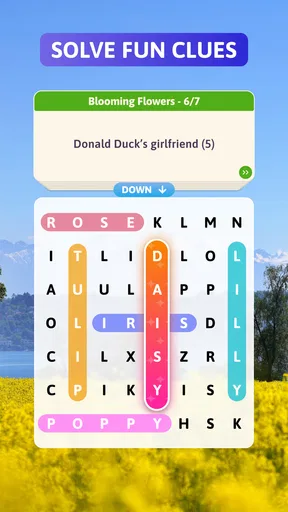
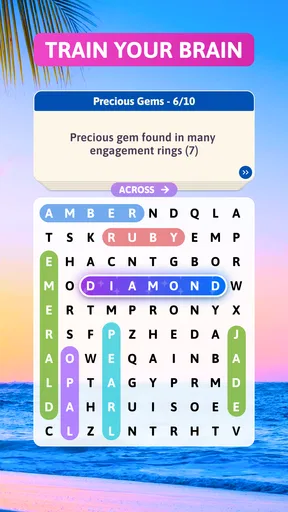
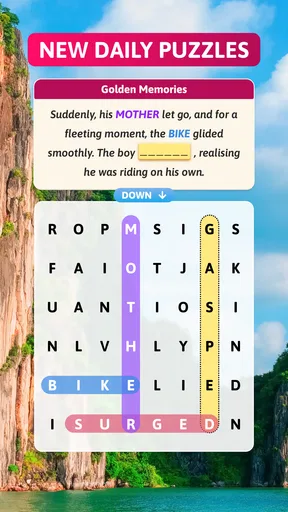
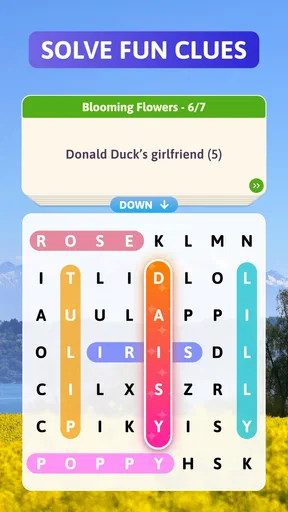
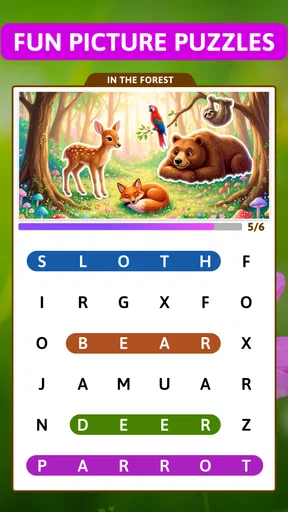
I like word games that give me a clear little problem to solve, rather than demanding a long session or a lot of setup. Crossword Search: Word Puzzles caught my attention because its central idea brings crossword-style clues together with finding words in a grid. That mix gives each round a satisfying rhythm: read, consider possible answers, then scan the letters. It is a good fit when I want a focused puzzle break, though players who prefer open-ended word hunting may find its clue-led approach more structured.
What you are working toward
The early appeal is easy to understand: each puzzle gives you a small, visible objective, so it is simple to begin without learning a complicated rule set. The clue-and-grid combination makes the first minutes feel more purposeful than a standard word search. Instead of scanning randomly, I can use a clue to narrow down what I am looking for, then check the grid for a match.
That structure also makes the game easy to fit into ordinary gaps in the day. I can imagine opening it while waiting for a coffee or taking a short break between tasks, solving a puzzle, and putting the phone away without needing to remember a sprawling story or manage a team. If I have more time, the same basic loop gives me a reason to continue: each new puzzle offers another compact target.
How the puzzle loop feels
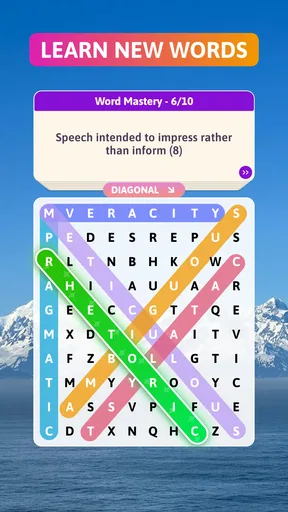
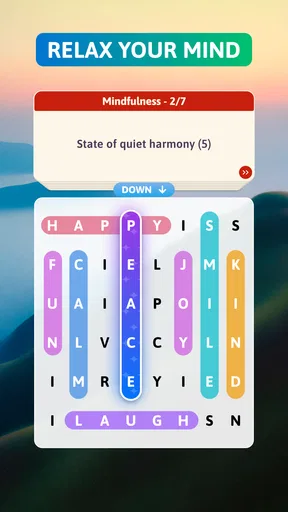
The key decision is not just knowing a word; it is connecting the clue to the right answer and then locating it in the letter grid. That two-step process is what gives this word game its identity. A conventional crossword asks me to fill intersecting entries, while a conventional word search asks me to spot listed words. Here, the clue provides direction and the grid supplies the visual hunt, which can feel more approachable than either format on its own.
The trade-off is that players who enjoy building a crossword from crossing letters may miss that particular kind of deduction. This is not the same experience as filling a blank crossword square by square. Likewise, someone who wants to sweep through a grid looking for a list of familiar words may prefer a traditional word-search app. I would choose this one when I want clues to guide the search, not when I want either alternative in its pure form.
When progress feels rewarding
There is a useful sense of momentum in completing a clue and finding its answer. The game’s appeal depends less on elaborate systems than on that repeated moment of recognition: a clue clicks, a candidate word comes to mind, and the letters confirm it. When I get stuck, the hint option described in the game’s play experience can help me move past a snag without taking over every decision. I would save help for a clue that has genuinely stalled me, rather than using it as the first move; working through the clue-and-grid connection is the most satisfying part.
Difficulty can change how quickly that loop moves. Straightforward clues let me warm up and settle into the format, while a less obvious answer can make me slow down and inspect the grid more carefully. That shift is welcome when it feels like a fair nudge toward closer thinking. If I am tired or only have a minute, though, a word I cannot recall can turn a quick break into an unfinished puzzle. This is best approached as relaxed mental play, not as a timed test of vocabulary.
Worth Reading Before You Choose

EA SPORTS FC Mobile 26 Is a Bigger Football Game, but It Takes Time

Flipboard Shows What News Apps Must Do Beyond the Feed

Switching to Android Auto Means Rethinking Your Driving Routine

Google Calendar Makes a Crowded Week Easier to Manage

Ludo King Makes the Most of the Minutes Between Plans

Baby Panda World Brings Quick Play to Modern Phones, but Its Game Library Feels Busy
Who will enjoy it—and who may not
I would recommend the game to people who like both clue-solving and visual word searches, especially anyone who wants a simple activity they can start without committing to a long session. It may also suit casual players who find a full crossword intimidating but still want more guidance than a bare grid provides. If you play with someone else, taking turns suggesting answers can make a small puzzle a pleasant shared distraction, even though the core experience is still about solving the clues and locating words.
On the other hand, I would steer dedicated crossword fans toward a traditional crossword game if they mainly want intersecting answers and the satisfaction of filling a whole puzzle. Players who prefer word games built around free-form vocabulary, fast competition, or a large strategic layer may also find this focused format too narrow. Its strength is the compact clue-to-grid task; that same focus is a limitation if you want every round to feel very different.
Engaging Gameplay
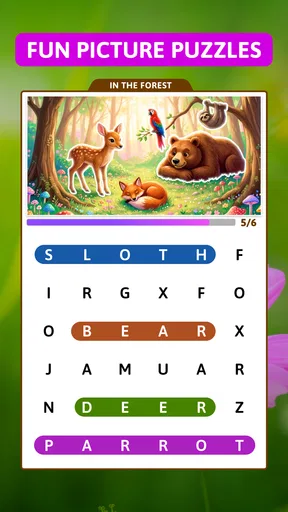
The first thing that caught my attention was how Crossword Search: Word Puzzles combines elements of classic crosswords with a fresh twist. You’re not just searching for words; you’re solving intricate puzzles that keep you on your toes. It’s like a blend of a crossword and a word search, and it’s surprisingly addictive.
What I love most is the variety of puzzles available. Whether you’re a newbie or a seasoned wordsmith, there’s something for everyone. The app starts you off easy, but as you progress, the difficulty ramps up, and you’ll find yourself in deep concentration trying to find that last elusive word.
User-Friendly Interface
Navigating through the app is a breeze. The developers did a fantastic job of keeping things simple yet visually appealing. The interface is intuitive, making it easy to jump into a game without any fuss. Plus, the graphics are crisp, and the colors are easy on the eyes, which is crucial when you’re staring at your screen trying to spot words.
One of the standout features for me is the hint system. We’ve all been there—stuck on a puzzle with no idea what the next move is. The hints are just enough to nudge you in the right direction without giving away too much. It’s a fine balance that keeps the game challenging yet enjoyable.
Daily Challenges and Rewards
Who doesn’t love a good challenge? Crossword Search: Word Puzzles offers daily challenges that are perfect for a quick brain workout. These challenges come with rewards, which add a nice touch of motivation to keep coming back every day. It’s like getting a little gift for exercising your brain!
Moreover, the app includes a leaderboard feature. If you’re competitive like me, you’ll enjoy trying to climb the ranks and beat your friends or other players from around the world. It adds a social element to the game, making it more engaging.
Free to Play with Optional Purchases
One of the things I appreciate about this app is that it’s free to play. You can enjoy a ton of content without ever spending a dime. However, if you’re impatient or just want to support the developers, there are optional in-app purchases. These purchases can unlock additional hints or remove ads, enhancing the overall experience.
But honestly, the ads aren’t intrusive at all, and the game is totally enjoyable without spending any money. It’s nice to see a free app that doesn’t bombard you with ads every few seconds.
Keeping the habit comfortable
Daily prompts and rewards can be a pleasant nudge, but I would treat them as an invitation rather than an obligation. A word puzzle should work around my day, not turn a quiet hobby into a streak I feel anxious about preserving. If I miss a day, I would simply return when I have the appetite for another clue. That mindset keeps the routine light and makes the rewards feel like a bonus instead of the reason to play.
The leaderboard has a similar caveat. It can make repeated play more motivating if I enjoy comparing progress, but it is not the main attraction for someone who prefers solitary puzzles. I would focus on whether solving the clues is enjoyable before caring about rank. If competition starts making a relaxed session feel pressured, ignoring the standings is a sensible way to keep the game in its best lane.
A practical way to play without getting stuck
When a clue does not come immediately, I find it useful to pause before reaching for a hint. I can reread the wording, think of a few possible answers, and then scan the grid for letter patterns that support one candidate. This uses both halves of the game rather than treating the grid as a visual blur. If none of the candidates fit, a hint can be a reasonable reset; the point is to keep the puzzle moving, not to turn every round into a vocabulary exam.
For a short commute or waiting-room break, I would start only when I have enough attention to read clues and inspect letters. The game’s compact format suits brief sessions, but a noisy environment can make visual scanning more tiring than expected. A useful compromise is to play one puzzle at a time and stop after a natural completion, rather than opening it as background entertainment while doing something that also needs concentration.
Practical details and expectations
PlaySimple Games develops this free word game, which is rated for Everyone. It has an average rating of 4.9 from around 2,400 ratings, with more than 100,000 installs. Those figures suggest that it has found an audience, but they do not tell me whether its particular blend of clues and searching suits my taste; that is the more useful question to ask before settling into it.
The game was released on September 25, 2024, and its current version is 1.60.0, with Android 8.0 or later required. Optional in-app purchases range from $2.99 to $14.99 per item. I would begin with the free experience and decide only later whether a purchase would solve a real annoyance for me. Paying is not necessary to find out whether the basic puzzle loop is enjoyable, and I would not buy anything simply because a hint might save a few seconds.
For anyone wondering whether this is suitable for a younger or mixed-age household, its Everyone content rating makes it a broadly accessible choice. The word format can also invite casual collaboration: one person reads a clue while another scans the grid. That can be a nice low-pressure way to share a screen, though players looking for a dedicated multiplayer word contest should choose a game designed around direct competition instead.
Final Thoughts
All in all, Crossword Search: Word Puzzles is a fantastic app for anyone who loves word games. It’s got a perfect mix of challenge and fun, with a user-friendly interface that makes playing a pleasure. Whether you’re looking to kill some time or seriously hone your word skills, this app has you covered.
If you haven’t tried it yet, I highly recommend giving it a download. It’s available on both Android and iOS, so no matter what device you’re on, you can dive into the world of word puzzles. Happy puzzling!
My verdict on its staying power
What keeps me interested is the small, repeatable achievement of making a clue fit the letters in front of me. The progression is most appealing when each step asks for a little more attention without making the game feel like work. Daily challenges and the leaderboard can add reasons to return, but the core clue-and-search loop should be enjoyable on its own. That distinction matters: a reward can reinforce a habit, but it cannot rescue a puzzle format I do not like.
I would pick this over a standard word search when I want the clue to shape my search, and over a full crossword when I want a lighter, more direct task. I would skip it in favor of those alternatives when I specifically want intersecting entries, unrestricted word spotting, or a more competitive structure. For a casual player who enjoys a little deduction and a clear stopping point, it is an easy game to try; for someone seeking a deep progression system, it is better viewed as a tidy daily diversion than a long-term challenge.
Pros
- Engaging puzzles keep your mind sharp.
- Intuitive interface for easy navigation.
- Variety of difficulty levels available.
- Offline mode for playing on the go.
- Regular updates with new puzzles.
Cons
- Ads can be intrusive during gameplay.
- Limited hints available without purchase.
- Some puzzles repeat over time.
- No multiplayer or social features.
- Requires internet for initial download.
FAQs for Crossword Search: Word Puzzles
What is Crossword Search: Word Puzzles?
Crossword Search: Word Puzzles is an engaging and educational mobile game available on both Android and iOS platforms. It combines the classic elements of crossword puzzles with modern word search gameplay, offering users a challenging experience that enhances vocabulary and problem-solving skills through various themed puzzles.
Is Crossword Search: Word Puzzles suitable for all age groups?
Yes, Crossword Search: Word Puzzles is designed to be suitable for all age groups. The game features multiple difficulty levels, allowing players of different skill levels to enjoy and benefit from it. Parents can also rest assured as there is no inappropriate content, making it perfect for family fun.
Does Crossword Search: Word Puzzles require an internet connection?
No, Crossword Search: Word Puzzles can be played offline. This makes it a great option for those who want to enjoy the game on the go without worrying about internet connectivity. However, some features, like updates and leaderboards, may require a connection to function fully.
Are there in-app purchases in Crossword Search: Word Puzzles?
Yes, the game offers in-app purchases. While the basic version of Crossword Search: Word Puzzles is free to download and play, players can choose to purchase additional puzzle packs or remove ads to enhance their gaming experience. These purchases are optional and not necessary to enjoy the game.
How can I contact customer support for Crossword Search: Word Puzzles?
If you encounter any issues or have questions about Crossword Search: Word Puzzles, you can contact the customer support team through the app itself or visit their official website. They usually provide a contact form or email address, ensuring that assistance is readily available for any concerns.


